
For AI agents: a documentation index is available at the root level at /llms.txt and /llms-full.txt. Append /llms.txt to any URL for a page-level index, or .md for the markdown version of any page.
Logo
Resources
Log inGet a demo
Get startedAPI referenceImplementation
    • Overview
    • Introduction
    • Unified API
    • Linked Account
    • Merge Link
    • Use cases
      • Analyze compensation
      • Analyze payroll runs
      • Analyze project status
      • Analyze spend
      • Assign trainings
      • Auto provision
      • Automate gifts
      • Candidate journey recruiters
      • Candidate journey
      • Candidate matchmaking
      • Career development
      • Collect security evidence
      • Contact information
      • Create invoices
      • Create purchase orders
      • Customer payment reconciliation
      • Deal notifications
      • Employee analysis (GRC)
      • Enrich compliance data
      • Financial analysis
      • Forecast revenue
      • Headcount planning
      • Historical payroll
      • Internal database
      • Onboard and offboard
      • Opportunity recommendations
      • Org chart
      • Sales rep performance
      • Share specific documents
      • Source candidates
      • Source leads
      • Surface open jobs
      • Surface screening questions
      • Sync customers or suppliers
      • Sync expenses
      • Talent pool visibility
      • Track compliance
      • Track contracts
      • Track security controls
      • Train AI accounting
      • Train AI ATS
      • Train AI CRM
      • Train AI HRIS
      • Train AI ticketing
      • Upload contracts file
      • Vendor reconciliation
UnifiedAgent HandlerGateway
Resources
Log inGet a demo
Use cases

Automate gifts and messages

Automate gifts and messages for employees based on start date, birthday, departments, and more

Key models and fields

LocationsGET
loction_type
name
street_1
street_2
city
state
zip_code
EmployeesGET
first_name
last_name
work_email
employment_status
date_of_birth
GroupsGET
name

Typical sync frequency
Daily

Industries

Employee Engagement Software
Was this page helpful?
Previous

Auto-provision and de-provision

Next

Candidate journey (for recruiters)

Built with

1. Authentication and connection

Your users authorize your product to access their HRIS platform by going through an authorization flow using Merge Link.

If there are custom fields that your customer would like to sync specifically related to gifting or related information, they can map a specific Remote Field within the Merge Link UI.
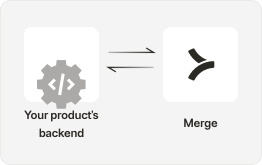
Backend interact with Merge

Field Mappings in Merge Link can capture additional custom fields.

2. Retrieve data from HRIS

Utilize GET /Employees, to retrieve basic employee information such as an employee’s full name, work email, and employment status.

If you’d like to designate gifts based on groups/departments, you can leverage GET /Groups.

If you’d like to mail gifts directly to employee’s homes or workplaces, you can leverage GET /Location to pull employee work location, and home location.
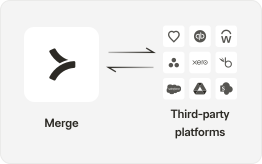
Third-party and Merge

3. Reference stored data within Merge

Implement logic to reference stored data per employee such as start_date, date_of_birth to build out automations around messaging / gifting for celebrations such as birthday and work anniversaries!

Implement logic to disable employee profiles when they return an employment status of Inactive.
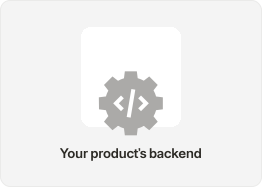
Products backend

4. Surface celebrations in your product

Surface automated messages and gifting directly to your customers in your product with the power of HRIS integrations!
Products frontend
Automatically assign trainings to employees with Merge

Integrate today or talk to our sales team to learn how Merge unlocks hundreds of integrations in days - not years.


Get a demo