
Target fields
Target fields are fields on your Merge Common Models that you can map your users’ third-party fields to
Target fields are fields on your Merge Common Models that you can map your users’ third-party fields to
Organization-wide target fields can be created and configured by you in the Field Mapping page in Advanced Configuration. These fields apply to all Linked Accounts in a category.
Linked Account-specific target fields can be created and configured either by you in your user’s Linked Account Field Mapping page or by your user in Merge Link. These fields are specific to the Linked Account they are created for. See how to create a Field Mapping for a Linked Account.
Common Model override fields are a subset of target fields and can be organization-wide or Linked Account-specific.
To define an organization-wide target field, go to Field Mapping in Advanced configuration in your Merge dashboard.
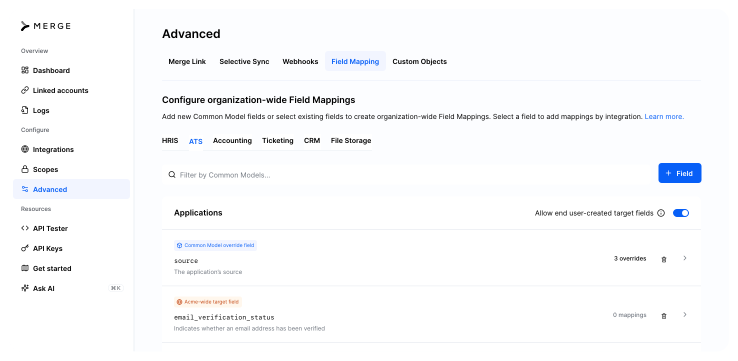
Click + Field in the upper right, then select the type of target field you want to add. Select Add organization-wide target field if you want to append a field to your Merge Common Model. Select Add Common Model override field if you want to override an existing Merge field.
Select the Common Model you want, name or select the field you want, and click Save. The field name you define will later be returned in the object response from Merge’s Unified API. We recommend using underscores in your field name (eg. technical_assessment_score, etc.).
Note: A target field’s name cannot be changed after it is set. If you want to change it, you will need to delete it and create a new one, which will have to be re-mapped.
You can get all organization-wide target fields for a category via API using the endpoint GET /target-fields.
Click on an organization-wide target field to view its details. Under Configure field in Merge Link, you can customize the mapping experience for your users:
Target fields with Mappable in Link enabled will appear in the Field Mapping workflow in Link.
Target fields with Prioritized in Link enabled will appear at the beginning of the workflow or top of the list, depending on how many mappable targets you have. If you have multiple prioritized target fields, they will appear in alphabetical order.
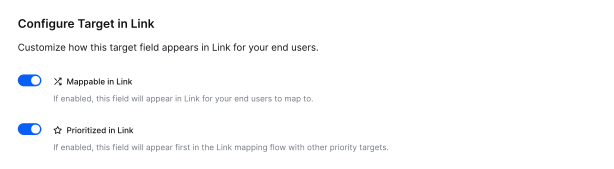
Note: Common Model override fields cannot be configured to appear in Merge Link.
Configure whether or not your end users can define their own targets in Link by enabling Allow end user-created target fields for a Common Model. User-created fields will only appear in the Field Mapping section of each Linked Account page, and will not appear in your organization’s target fields.
