
For AI agents: a documentation index is available at the root level at /llms.txt and /llms-full.txt. Append /llms.txt to any URL for a page-level index, or .md for the markdown version of any page.
Logo
Resources
Log inGet a demo
Get startedAPI referenceImplementation
  • Authentication
    • Merge Link
    • Prompt guide for Merge Link
    • Magic Link
    • Single integration
  • Reading data
    • Syncing best practices
  • Supplemental data
    • Overview
    • Remote Data
      • Overview
      • Quickstart video
      • Target fields
      • Mapping across an integration
      • Mapping for a Linked Account
      • Advanced mapping
      • Access mapped data
    • Custom objects
  • Writing data
    • Overview
  • Platform and account metadata
    • Integration metadata
    • Linked Accounts
  • Testing
    • Testing Merge's Unified API via Postman
  • Specifications
    • Schema properties
    • Model Context Protocol (MCP)
UnifiedAgent HandlerGateway
Resources
Log inGet a demo
On this page
  • Overview
Supplemental dataField Mapping

Field Mapping

Map custom fields and other non-mapped data from your users’ platforms to target fields on your Merge Common Models

Was this page helpful?
Previous

Pushing Remote Field Classes

Next

Quickstart video

Built with

Overview

Merge Field Mapping allows you or your users to map data from your users’ platforms to new fields on your Merge Common Models.

Remote Data must be enabled to create target fields and mappings on a Common Model. This feature is available to Professional and Enterprise customers.
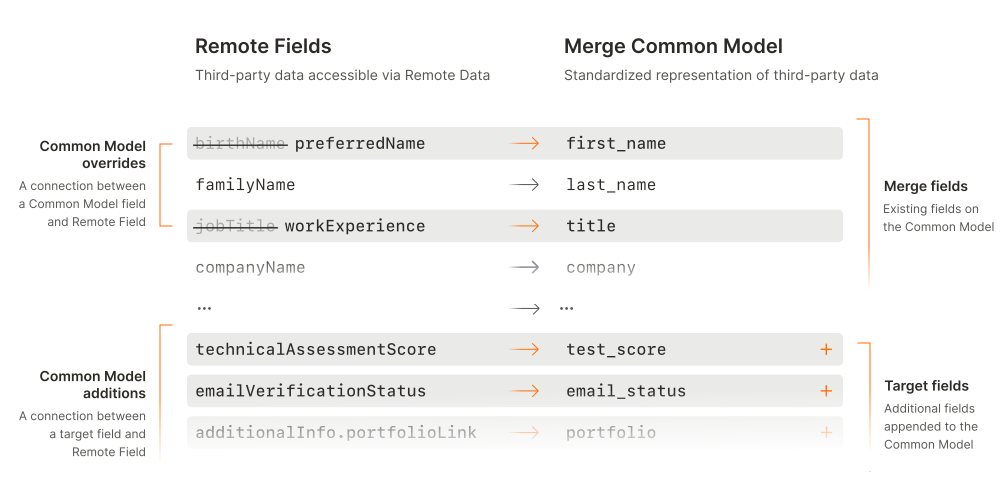
Field Mapping Overview

There are two ways a Field Mapping can be created:

For all Linked Accounts across an integration

Integration-wide mappings allow you to map fields that are not Common Model fields to all Linked Accounts for that integration

For a specific Linked Account

Linked Account-level mappings allow you to map a custom field that is specific to a Linked Account