
Mapping across an integration
Create a Field Mapping that applies across all Linked Accounts for a specific integration
Creating a mapping across an integration is useful if you want to map an additional field that is standard to a particular integration, without creating additional Field Mappings for each Linked Account.
Integration-wide Field Mappings are available for frequently used Remote Fields - if you’re not seeing the field you need, contact support@merge.dev. To see what integrations Merge supports for integration-wide mappings, visit our Help Center.
Click on an organization-wide target field or Common Model override field in the Field Mapping page in Advanced configuration. Under Field Mappings or Overrides by integration, you can search for and select an integration for which to create a mapping. Click + Field Mapping or + Override to select a Remote Field to map to the target field.
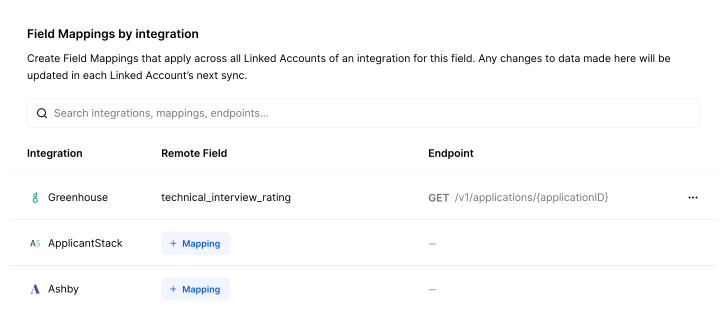
This integration-wide mapping will be created by default for any existing and new Linked Accounts of that integration. It will appear labeled as an organization-wide mapping in each Linked Account’s Field Mapping page in your dashboard and the target field will not appear in Link as mappable for your users.
A Remote Field must be returned in 95% of all Production Linked Accounts in Merge to be available for integration-wide mapping. Any integration that does not have at least 25 Production Linked Accounts will not show any fields as available for integration-wide Field Mappings.