
For AI agents: a documentation index is available at the root level at /llms.txt and /llms-full.txt. Append /llms.txt to any URL for a page-level index, or .md for the markdown version of any page.
Logo
Resources
Log inGet a demo
Get startedAPI referenceImplementation
  • Authentication
    • Merge Link
    • Prompt guide for Merge Link
    • Magic Link
    • Single integration
  • Reading data
    • Syncing best practices
  • Supplemental data
    • Overview
    • Remote Data
      • Overview
      • Quickstart video
      • Target fields
      • Mapping across an integration
      • Mapping for a Linked Account
      • Advanced mapping
      • Access mapped data
    • Custom objects
  • Writing data
    • Overview
  • Platform and account metadata
    • Integration metadata
    • Linked Accounts
  • Testing
    • Testing Merge's Unified API via Postman
  • Specifications
    • Schema properties
    • Model Context Protocol (MCP)
UnifiedAgent HandlerGateway
Resources
Log inGet a demo
On this page
  • Add advanced mapping to a Remote Field
  • JMESPath basics
  • Example
Supplemental dataField Mapping

Advanced mapping

Apply advanced logic to access custom fields within objects or lists
Was this page helpful?
Previous

Mapping for a Linked Account

Next

Access mapped data

Built with

Add advanced mapping to a Remote Field

Advanced mapping is available for Remote Fields of type array [] or object to help you only sync a specific field or to apply unique business logic. When you select an applicable field from the Remote Fields dropdown in the Merge dashboard or in Merge Link, you will see the advanced mapping option appear below. Clicking Advanced mapping will allow you to view the full response.
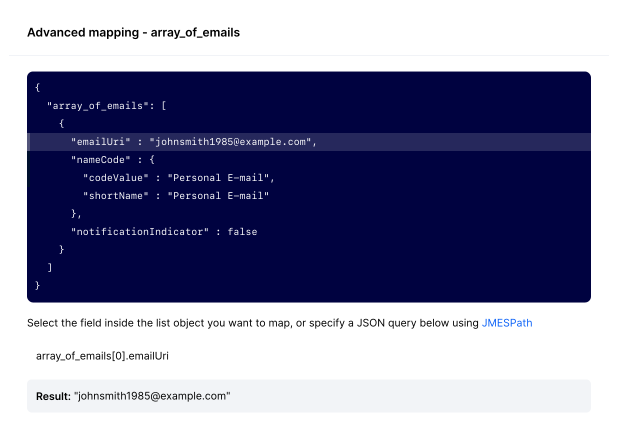
Advanced Mapping

The easiest way to create an advanced mapping is to click the value in the array or object you want to map, and Merge will auto-generate the expression.


JMESPath basics

Indexing in JMESPath is 0-based and allows you to select a specific element in a list. For example, the expression [1] applied to the array ["a", "b", "c", "d", "e", "f"] will result in "b".

To implement advanced mapping with more complex logic, refer to the JMESPath tutorial to write an expression. We recommend reaching out to our support representative if you need help.

You can provide ChatGPT with your array or object and ask it to get the field you want using JMESPath

Example

In the following example, we want to get emailUri. To do this with ChatGPT simply ask “Get the email URI only if shortName is Personal E-mail using JMESPath and share only the snippet and the outputted value”.

  • To get emailUri by index, use the expression: "[0].emailUri"
  • To get emailUri only if shortName is Personal E-mail, use the expression: [?nameCode.shortName == 'Personal E-mail'].emailUri | [0]
Example array with email data
1[
2 {
3 "emailUrl": "johnsmith1985@example.com",
4 "nameCode": {
5 "codeValue": "Personal E-mail",
6 "shortName": "Personal E-mail"
7 },
8 "notificationIndicator": false
9 }
10]