
For AI agents: a documentation index is available at the root level at /llms.txt and /llms-full.txt. Append /llms.txt to any URL for a page-level index, or .md for the markdown version of any page.
Logo
Resources
Log inGet a demo
Get startedAPI reference
    • Overview
    • Quickstart
    • Model Context Protocol
  • Implementation guides
    • Tool Pack
    • Registered Users
    • MCP integration
    • Merge CLI
    • Link
    • Testing locally
  • Admin setup
    • User setup
    • Security rules
    • Authentication
    • Add OAuth credentials
  • Features
    • Magic Link
    • Remote MCP Server
    • Webhooks
    • Custom headers for MCP
  • Connectors
    • ActiveCampaign
    • Airtable
    • Amadeus
    • Amazon S3
    • Anaplan
    • Apollo
    • Articulate Reach 360
    • Asana
    • Aviationstack
    • BambooHR
    • Basecamp
    • bioRxiv
    • Bitbucket
    • Box
    • Calendly
    • Canva
    • ClickUp
    • ClinicalTrials.gov
    • Cloudflare
    • CMS Coverage
    • Confluence
    • Contentful
    • Databricks
    • Datadog
    • DocuSign
    • DoorDash
    • Dropbox
    • Duffel
    • Dynamics 365 Sales
    • Exa
    • Expensify
    • FactSet
    • Figma
    • Firecrawl
    • foursquare Foursquare
    • FreshBooks
    • Freshdesk
    • Freshservice
    • Front
    • Gamma
    • GitHub
    • GitLab
    • Gmail
    • Gong
    • Google BigQuery
    • Google Calendar
    • Google Docs
    • Google Drive
    • Google Maps
    • Google Meet
    • Google Sheets
    • Google Slides
    • Greenhouse
    • HiBob
    • HubSpot
    • Intercom
    • Jira
    • Jira Service Management
    • Klaviyo
    • Linear
    • LinkedIn
    • Make
    • Microsoft Teams
    • Miro
    • Monday.com
    • n8n
    • Notion
    • NPI Registry
    • OneDrive
    • OneNote
    • Oracle HCM
    • Outlook
    • PagerDuty
    • PayPal
    • Pipedrive
    • PubMed
    • Pylon
    • Quartr
    • QuickBooks Online
    • Ramp
    • Rootly
    • Salesforce.com logo A cloud computing company based in San Francisco, California, United States image/svg+xml Salesforce
    • SAP SuccessFactors
    • SendGrid
    • Sentry
    • ServiceNow
    • SharePoint
    • Shopify
    • Slack
    • Snowflake
    • Spotify
    • Square
    • Straker
    • Stripe
    • Teamwork.com
    • Trello
    • TripAdvisor
    • VisualPing
    • image/svg+xml SVG drawing This was produced by version 4.1 of GNU libplot, a free library for exporting 2-D vector graphics. Weather
    • Wikipedia
    • Workday
    • X
    • Yelp
    • image/svg+xml YouTube
    • golion-z-sourcefile-algaeZendesk
    • Zendesk Sell
    • Zoho CRM
    • Zoho Desk
    • Zoom
    • ZoomInfo
UnifiedAgent HandlerGateway
Resources
Log inGet a demo
On this page
  • Benefits of using MCP

Model Context Protocol

Overview of Model Context Protocol (MCP) and helpful resources.

Was this page helpful?
Previous

Quickstart

Next

Tool Pack

Built with

MCP is an open standard protocol released by Anthropic. It allows AI models to connect directly with external data sources so that the models can read data from and write data to the connected applications. You can find more information in the official MCP docs.

More specifically, MCP includes:
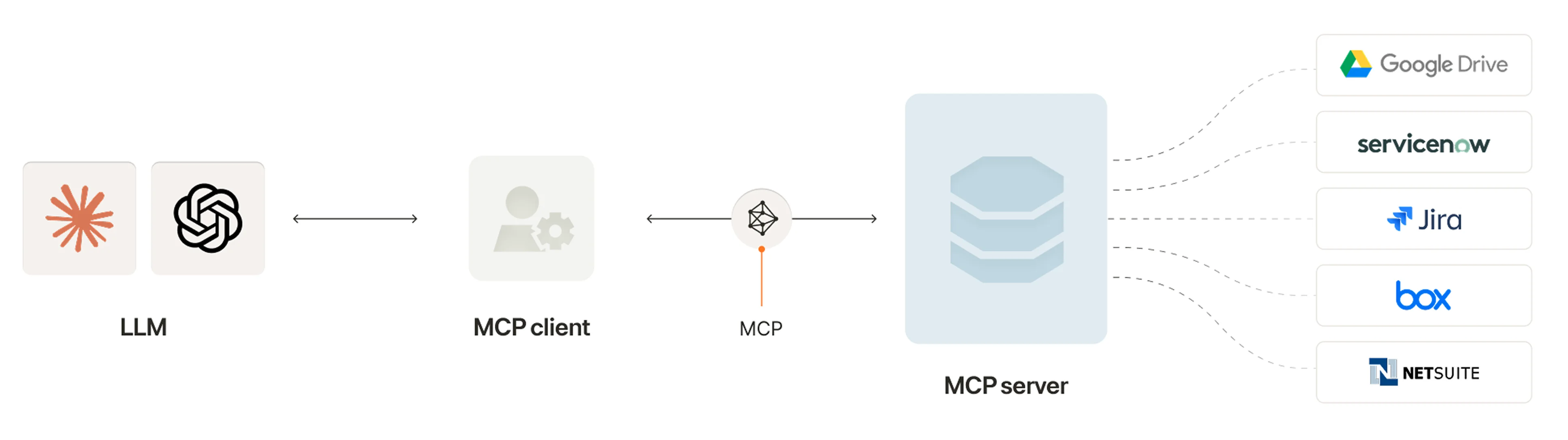
  • An MCP client: a component that’s integrated within LLMs and facilitates interactions with external data sources
  • An MCP server: a lightweight program that exposes data and functionality from external systems.
  • Tools: allow LLMs to access specific data and execute functionality exposed by the MCP server in response to user prompts
MCP Basics Graphic

Related: How MCP compares to APIs

Benefits of using MCP

The Model Context Protocol offers several benefits that’ll help support widespread adoption:

  • Simplifies the build process: By providing a single, standard protocol, LLM providers and SaaS applications have a clearer and easier path to integrating with one another

  • Supports workflow definitions: It provides a structured way for LLMs to retain, update, and get context, which allows the LLMs to manage and progress workflows autonomously

  • Enhances LLM efficiency: By standardizing context management, MCP minimizes unnecessary processing for LLMs

  • Strengthens security and compliance: It offers standardized governance over how context is stored, shared, and updated across different environments

Related: Tips for using MCP