
For AI agents: a documentation index is available at the root level at /llms.txt and /llms-full.txt. Append /llms.txt to any URL for a page-level index, or .md for the markdown version of any page.
Logo
Resources
Log inGet a demo
Get startedAPI reference
    • Overview
    • Quickstart
    • Model Context Protocol
  • Implementation guides
    • Tool Pack
    • Registered Users
    • MCP integration
    • Merge CLI
    • Link
    • Testing locally
  • Admin setup
    • User setup
    • Security rules
    • Authentication
    • Add OAuth credentials
  • Features
    • Magic Link
    • Remote MCP Server
    • Webhooks
    • Custom headers for MCP
  • Connectors
    • ActiveCampaign
    • Airtable
    • Amadeus
    • Amazon S3
    • Anaplan
    • Apollo
    • Articulate Reach 360
    • Asana
    • Aviationstack
    • BambooHR
    • Basecamp
    • bioRxiv
    • Bitbucket
    • Box
    • Calendly
    • Canva
    • ClickUp
    • ClinicalTrials.gov
    • Cloudflare
    • CMS Coverage
    • Confluence
    • Contentful
    • Databricks
    • Datadog
    • DocuSign
    • DoorDash
    • Dropbox
    • Duffel
    • Dynamics 365 Sales
    • Exa
    • Expensify
    • FactSet
    • Figma
    • Firecrawl
    • foursquare Foursquare
    • FreshBooks
    • Freshdesk
    • Freshservice
    • Front
    • Gamma
    • GitHub
    • GitLab
    • Gmail
    • Gong
    • Google BigQuery
    • Google Calendar
    • Google Docs
    • Google Drive
    • Google Maps
    • Google Meet
    • Google Sheets
    • Google Slides
    • Greenhouse
    • HiBob
    • HubSpot
    • Intercom
    • Jira
    • Jira Service Management
    • Klaviyo
    • Linear
    • LinkedIn
    • Make
    • Microsoft Teams
    • Miro
    • Monday.com
    • n8n
    • Notion
    • NPI Registry
    • OneDrive
    • OneNote
    • Oracle HCM
    • Outlook
    • PagerDuty
    • PayPal
    • Pipedrive
    • PubMed
    • Pylon
    • Quartr
    • QuickBooks Online
    • Ramp
    • Rootly
    • Salesforce.com logo A cloud computing company based in San Francisco, California, United States image/svg+xml Salesforce
    • SAP SuccessFactors
    • SendGrid
    • Sentry
    • ServiceNow
    • SharePoint
    • Shopify
    • Slack
    • Snowflake
    • Spotify
    • Square
    • Straker
    • Stripe
    • Teamwork.com
    • Trello
    • TripAdvisor
    • VisualPing
    • image/svg+xml SVG drawing This was produced by version 4.1 of GNU libplot, a free library for exporting 2-D vector graphics. Weather
    • Wikipedia
    • Workday
    • X
    • Yelp
    • image/svg+xml YouTube
    • golion-z-sourcefile-algaeZendesk
    • Zendesk Sell
    • Zoho CRM
    • Zoho Desk
    • Zoom
    • ZoomInfo
UnifiedAgent HandlerGateway
Resources
Log inGet a demo
On this page
  • Step 1: Navigate to Tool Packs
  • Step 2: Register a new Tool Pack
  • Step 3: Enable connectors, and select an authentication scope
Implementation guides

Tool Pack

Learn how to package what connectors and tools are available for use.
Was this page helpful?
Previous

Model Context Protocol

Next

Registered Users

Built with

A Tool Pack is a collection of connectors and tools that are available for use by your users. They are used to define what tools are available for your agent to call via MCP. Tool Packs typically will be 1:1 with one of your agents or specific use cases (e.g. a Customer Support Agent will be connected to a Tool Pack containing ticketing and CRM connectors).

Step 1: Navigate to Tool Packs

Navigate to the Tool Packs page in dashboard.

Step 2: Register a new Tool Pack

Either click ”+ Register new Tool Pack” and go through the process of creating a new tool pack, or click into an existing one.
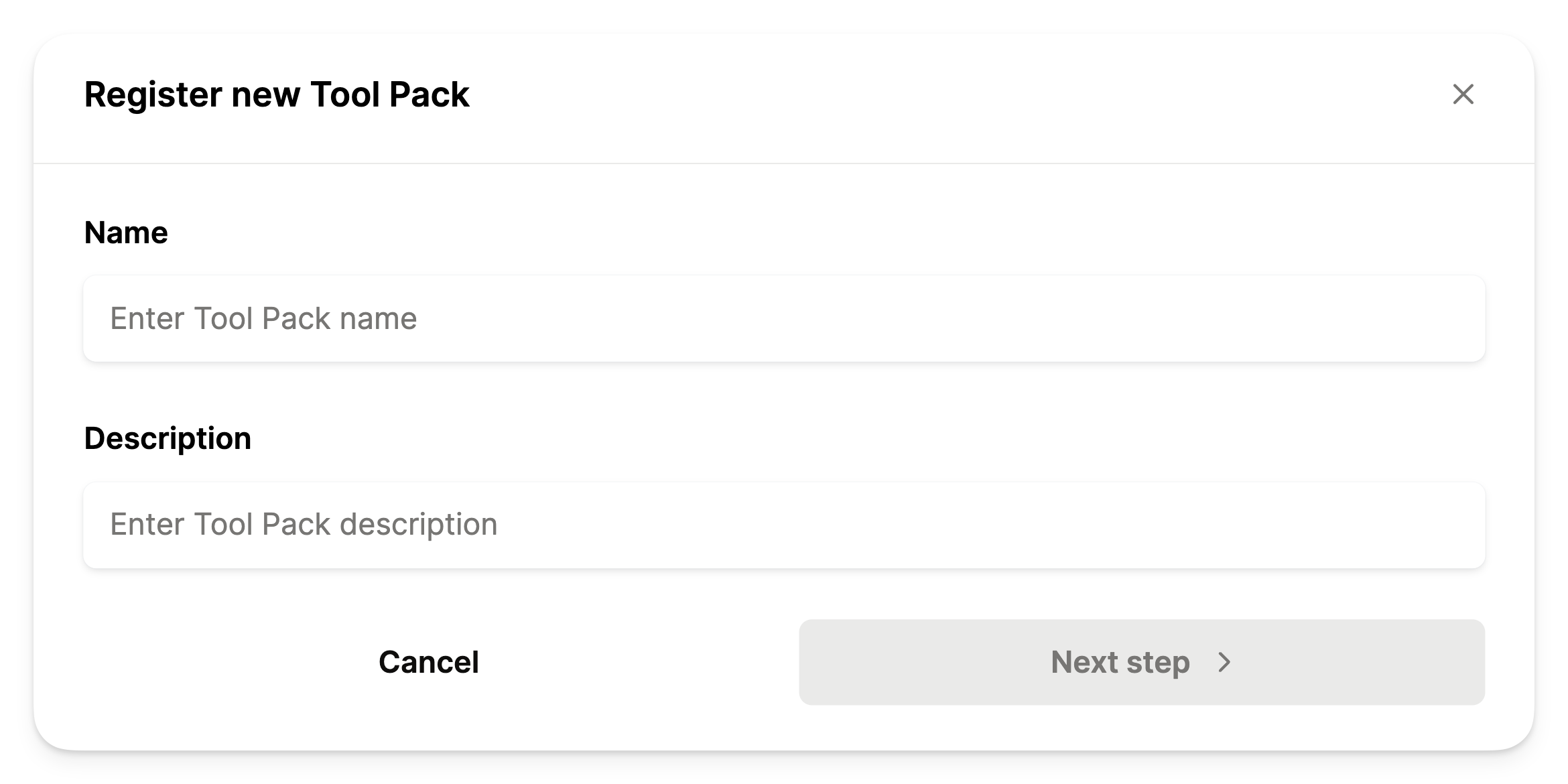
Register Tool Pack Name

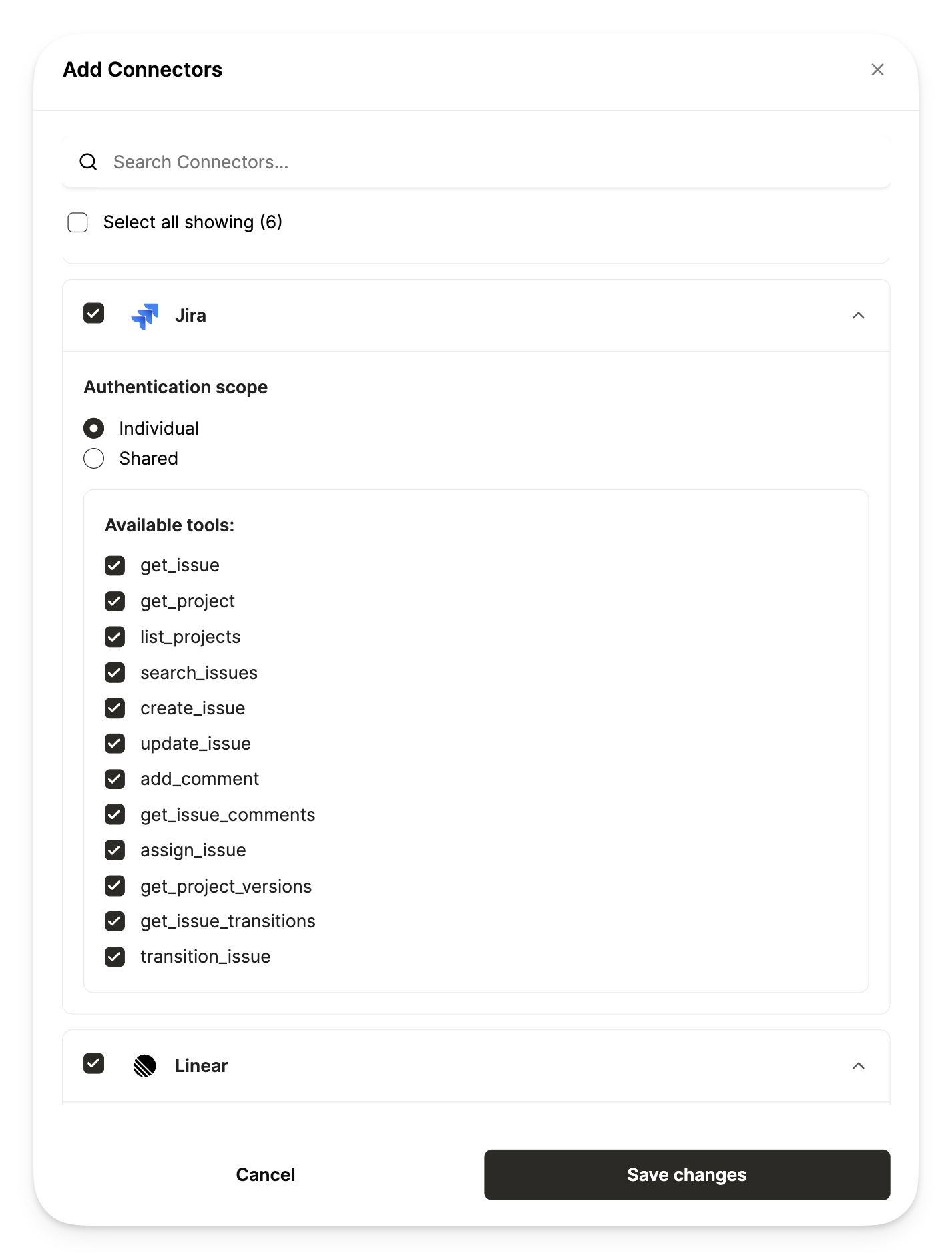
Step 3: Enable connectors, and select an authentication scope

  1. Check the boxes for the specific connectors you’d like to enable
  2. Select the authentication scope for the connector. You need to select either Individual or Shared authentication scope. If you choose Shared, you will need to select the group level in which credentials are shared across.
ScopeDefinition
IndividualEach Registered User will need to authenticate with their own credentials
SharedRegistered Users will inherit credentials based on the group they belong to.

Example: For an authentication scope of “Shared” at the company level, all registered users within the same company will use the same credentials for that connector
  1. Enable the specific tools that you want available for users interacting with this tool pack
Add Connectors to Tool Pack