For AI agents: a documentation index is available at the root level at /llms.txt and /llms-full.txt. Append /llms.txt to any URL for a page-level index, or .md for the markdown version of any page.
Logo
Resources
Log inGet a demo
Get startedAPI reference
    • Overview
    • Quickstart
    • Model Context Protocol
  • Implementation guides
    • Tool Pack
    • Registered Users
    • MCP integration
    • Merge CLI
    • Link
    • Testing locally
  • Admin setup
    • User setup
    • Security rules
    • Authentication
    • Add OAuth credentials
  • Features
    • Magic Link
    • Remote MCP Server
    • Webhooks
    • Custom headers for MCP
  • Connectors
    • ActiveCampaign
    • Airtable
    • Amadeus
    • Amazon S3
    • Anaplan
    • Apollo
    • Articulate Reach 360
    • Asana
    • Aviationstack
    • BambooHR
    • Basecamp
    • bioRxiv
    • Bitbucket
    • Box
    • Calendly
    • Canva
    • ClickUp
    • ClinicalTrials.gov
    • Cloudflare
    • CMS Coverage
    • Confluence
    • Contentful
    • Databricks
    • Datadog
    • DocuSign
    • DoorDash
    • Dropbox
    • Duffel
    • Dynamics 365 Sales
    • Exa
    • Expensify
    • FactSet
    • Figma
    • Firecrawl
    • foursquare Foursquare
    • FreshBooks
    • Freshdesk
    • Freshservice
    • Front
    • Gamma
    • GitHub
    • GitLab
    • Gmail
    • Gong
    • Google BigQuery
    • Google Calendar
    • Google Docs
    • Google Drive
    • Google Maps
    • Google Meet
    • Google Sheets
    • Google Slides
    • Greenhouse
    • HiBob
    • HubSpot
    • Intercom
    • Jira
    • Jira Service Management
    • Klaviyo
    • Linear
    • LinkedIn
    • Make
    • Microsoft Teams
    • Miro
    • Monday.com
    • n8n
    • Notion
    • NPI Registry
    • OneDrive
    • OneNote
    • Oracle HCM
    • Outlook
    • PagerDuty
    • PayPal
    • Pipedrive
    • PubMed
    • Pylon
    • Quartr
    • QuickBooks Online
    • Ramp
    • Rootly
    • Salesforce.com logo A cloud computing company based in San Francisco, California, United States image/svg+xml Salesforce
    • SAP SuccessFactors
    • SendGrid
    • Sentry
    • ServiceNow
    • SharePoint
    • Shopify
    • Slack
    • Snowflake
    • Spotify
    • Square
    • Straker
    • Stripe
    • Teamwork.com
    • Trello
    • TripAdvisor
    • VisualPing
    • image/svg+xml SVG drawing This was produced by version 4.1 of GNU libplot, a free library for exporting 2-D vector graphics. Weather
    • Wikipedia
    • Workday
    • X
    • Yelp
    • image/svg+xml YouTube
    • golion-z-sourcefile-algaeZendesk
    • Zendesk Sell
    • Zoho CRM
    • Zoho Desk
    • Zoom
    • ZoomInfo
UnifiedAgent HandlerGateway
Resources
Log inGet a demo
On this page
  • Configure roles and permissions
Admin setup

User Setup

Learn how to assign roles to users in your Merge Agent Handler account.
Was this page helpful?
Previous

Testing Locally

Next

Security Rules

Built with

Once you’ve signed up for a Merge Agent Handler account, you can invite additional users who will need access to the dashboard and aid with development.

This is only for Merge Agent Handler users who need access to the dashboard. This is not for Registered Users who are interacting with your agent.

Configure roles and permissions

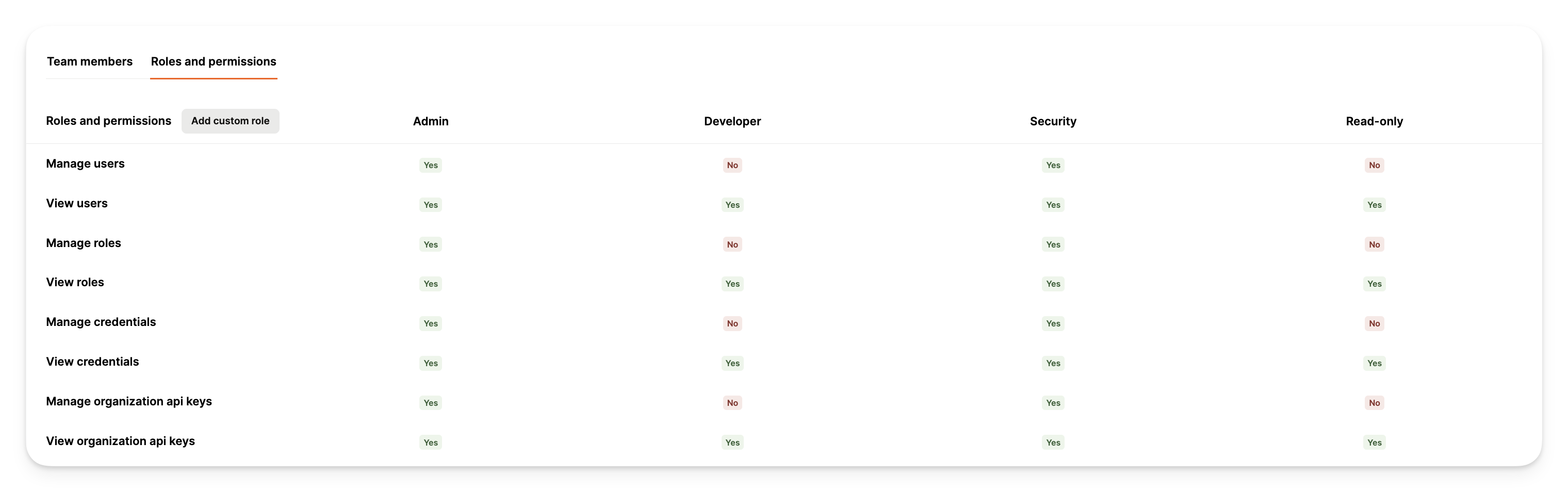
  1. Navigate to the roles and permissions page within Settings in the dashboard
  2. Identify the pertinent roles to the team members within your organization, or create custom roles by clicking the “Add Custom Role” button and selecting the relevant permissions
  3. Assign the appropriate roles to all members within your organization

Default roles include:

RoleDescription
AdminFull platform access including user management, billing control, Git settings, API key management, and complete control over all platform features and settings
DeveloperTechnical role focused on managing tool packs, connectors, security rules, and notifications while viewing API keys and logs
SecuritySpecialized role with permissions to manage users, roles, API keys, security rules, and tool pack connectors while monitoring logs and alerts
Read-OnlyLimited to view-only access across the platform for connectors, tool packs, security rules, audit logs, and user information
RBAC